Convert MOV to MP4 on Mac (Offline)
QuickTime Player, iPhones and macOS screen recordings save MOV files, and plenty of sites, Windows PCs and Android phones prefer MP4. Macsential converts MOV to MP4 on your Mac with H.264 or HEVC, one video or many.
Convert MOV to MP4 in Macsential
- 1
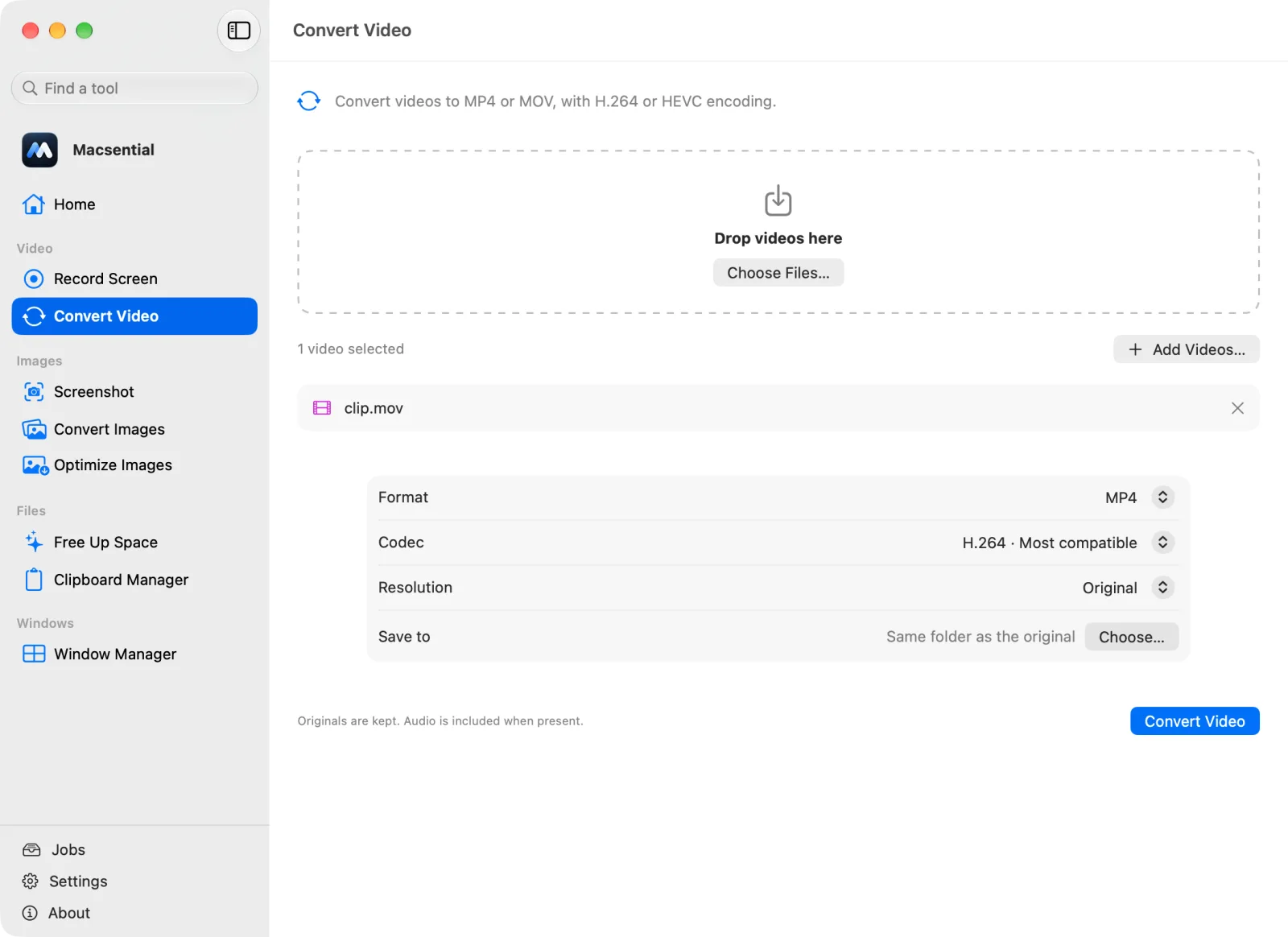
Open Convert Video in Macsential's sidebar, or select the movies in Finder and choose Quick Actions ▸ Convert Video….
- 2
Drop the MOV files on the page. You can add several.
- 3
Set Format to MP4. Keep Codec on H.264 · Most compatible, or pick HEVC · Smaller files if the video only needs to play on recent devices. Leave Resolution at Original, or choose up to 1080p or 4K to make big videos smaller.
- 4
Click Convert. Each MP4 is saved next to its original as “(converted)”, and the MOV isn't changed.
In our test
We converted two 30 s 1080p QuickTime movies to MP4 with the default settings (H.264, original size): an H.264 MOV like a screen recording or camera export, and the same clip as HEVC, which is what iPhones record.
| Sample | 30 s 1080p H.264 + AAC QuickTime movie, cut without re-encoding from Big Buck Bunny |
|---|---|
| Input | 28.7 MB, 1920 × 1080, H264 7.2 Mbps, 30 s |
| Output | 28.0 MB (−2 %), 1920 × 1080, H264 7.2 Mbps |
| Video | Copied into the MP4 unchanged (identical compressed frames) |
| Sound | AAC 431 kbps → AAC 255 kbps |
| Settings | MP4, H.264, Original size |
| Time | 0.57 s |
| Metadata | Creation date removed |
| Mac | Apple M1 Pro MacBook Pro, macOS 27.0.1 |
| Sample | the same 30 s clip as an HEVC QuickTime movie at 8 Mbps, like an iPhone video |
|---|---|
| Input | 29.9 MB, 1920 × 1080, HEVC 7.5 Mbps, 30 s |
| Output | 33.3 MB (+11 %), 1920 × 1080, H264 8.6 Mbps |
| Video | Re-encoded from HEVC to H264 |
| Sound | AAC 431 kbps → AAC 255 kbps |
| Settings | MP4, H.264, Original size |
| Time | 4.17 s |
| Metadata | Creation date removed |
| Mac | Apple M1 Pro MacBook Pro, macOS 27.0.1 |
Sample files, measured with Macsential's converter on our Mac. Your files and Mac will give different numbers. How we measure
When MOV to MP4 makes sense
MOV and MP4 are close relatives and often hold the same H.264 or HEVC video, but MP4 is the format websites, social networks, Windows and Android expect. Convert when an upload is rejected, a video won't play on someone else's device, or a tool only lists .mp4.
Quality and file size
What happens depends on the video inside the MOV.
- H.264 MOV: with H.264 at the original size, the video was copied unchanged in our test: the MP4 holds the same compressed frames, so the picture is identical, and the 28.7 MB MOV became a 28.0 MB MP4 in 0.57 s.
- HEVC MOV (iPhone videos): the video is re-encoded to H.264 with Apple's encoder at its highest-quality setting, so it plays everywhere. Our 29.9 MB HEVC MOV became 33.3 MB (+11 %) in 4.17 s.
Choose HEVC as the codec to keep files small when the video only needs to play on recent devices, or a lower resolution for a smaller H.264 file. Video is never upscaled.
Sound and metadata
The sound track is kept and re-encoded as AAC: 431 kbps became 255 kbps in our test. The original creation date was removed: the MP4 is dated when it was converted, so keep the MOV if that date matters. MP4s are written with “fast start”, so they begin playing on the web before they finish downloading.
Batches
Drop several videos and they're converted one after another, each to its own MP4, with progress for the whole batch. If one file can't be read, the others still finish.
With what's built into macOS
QuickTime Player's File ▸ Export As and Finder's Encode Selected Video Files both re-encode videos, but both save MOV files. Apple's QuickTime Player guide says it plainly: QuickTime Player doesn't export movies as MP4. The built-in way to get an MP4 is the avconvert command in Terminal, for example avconvert -s in.mov -p Preset1920x1080 -o out.mp4.
Where it falls short
- QuickTime Player and Finder only write .mov, so they don't solve the MP4 problem.
avconvertworks one file per command and has no progress for a batch.- Renaming .mov to .mp4 sometimes plays but isn't a real conversion, and some sites reject the file.
Related conversions
Questions
Can QuickTime Player convert MOV to MP4?
No. Its File ▸ Export As saves MOV files only, and Apple's guide says QuickTime Player doesn't export movies as MP4.
Is there a free built-in way to get an MP4 on a Mac?
Yes, in Terminal: avconvert -s input.mov -p Preset1920x1080 -o output.mp4. The .mp4 extension makes it write an MP4.
Does converting MOV to MP4 lose quality?
Not in our test of an H.264 MOV kept at H.264 and the original size: its video was copied unchanged. HEVC MOVs, like iPhone videos, are re-encoded to H.264 at Apple's highest-quality setting, which is hard to tell apart from the original. The sound is re-encoded as AAC.
Will the MP4 be smaller than the MOV?
Not necessarily. In our test an H.264 MOV of 28.7 MB became 28.0 MB, and an HEVC MOV of 29.9 MB became 33.3 MB, because H.264 needs more data than HEVC for the same picture. Choose HEVC or 1080p for smaller files.
Is the sound kept?
Yes. The audio track is converted to AAC along with the video.
Can I just rename .mov to .mp4?
It sometimes plays, because both are similar containers, but it isn't a real MP4 and some sites and players reject it. Converting rewrites the file properly.
Last updated