Convert HEIC to PNG on Mac (Offline)
PNG is the safe choice when you need an iPhone photo in an app or website that doesn't accept HEIC and you don't want any quality lost. Macsential converts HEIC to PNG on your Mac, a whole folder at a time, and leaves the originals alone.
Convert HEIC to PNG in Macsential
- 1
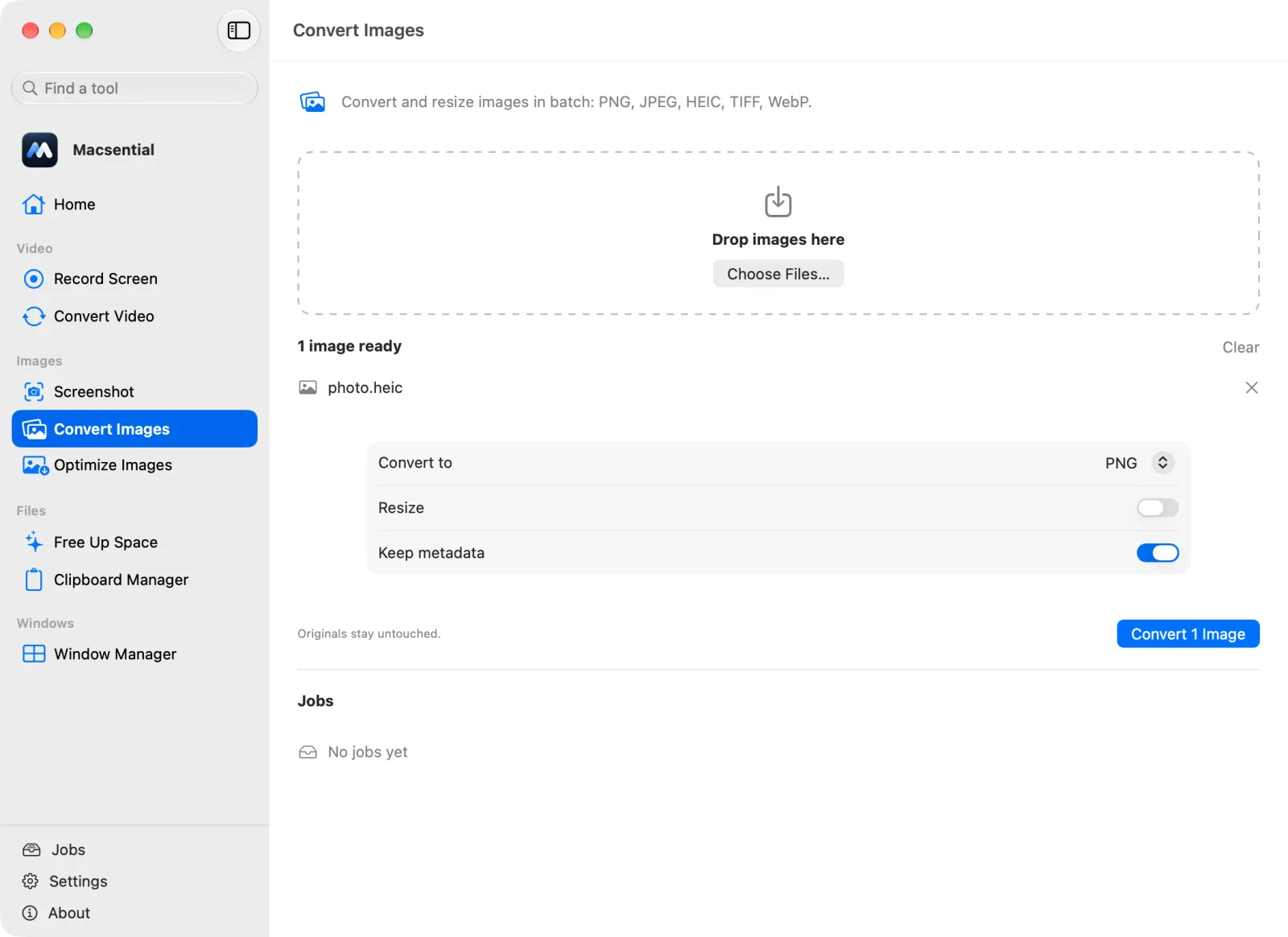
Open Convert Images in Macsential's sidebar, or select the files in Finder and choose Quick Actions ▸ Convert Images….
- 2
Drop the files on the page, or click Choose Files…. You can add as many as you like.
- 3
Set Convert to to PNG. Turn Resize on only if you want smaller dimensions, and leave Keep metadata on to keep the camera, date and location data.
- 4
Click Convert. The .png files are saved next to the originals, which aren't changed.
In our test
We converted a 1.5 MB HEIC (an iPhone photo saved as HEIC by macOS) to PNG with the default settings.
| Sample | the iPhone photo saved as HEIC by macOS |
|---|---|
| Input | 1.5 MB, 4032 × 3024 px |
| Output | 17.5 MB (+1037 %), 4032 × 3024 px |
| Settings | PNG, keep metadata on |
| Time | 0.93 s |
| Metadata | Camera make and model kept, Date taken kept, GPS location kept, Color profile kept, Orientation kept |
| Mac | Apple M1 Pro MacBook Pro, macOS 27.0.1 |
One sample file, measured with Macsential's converter on our Mac. Your files and Mac will give different numbers. How we measure
When HEIC to PNG makes sense
HEIC is what iPhones save by default. It's small, but plenty of Windows apps, web forms and older editors still can't open it. PNG opens almost everywhere and is lossless, so nothing more is lost on the way. Choose PNG when the photo will be edited again or when every pixel matters; for sharing or uploading, JPG is usually the better fit because it's far smaller.
Quality and file size
PNG keeps every pixel of the decoded photo, so there's no quality setting and no further loss. The price is size: a photo that was 1.5 MB as HEIC became 17.5 MB as PNG in our test (11.4× the size). If size matters, turn on Resize and set a longest edge, or convert to JPG instead.
Camera, date and location data
With Keep metadata on (the default), the camera model was kept, the date taken was kept and the GPS location was kept in our test. Turn Keep metadata off before sharing photos publicly: camera, date and location data are then left out, and the orientation is still kept so the photo isn't turned sideways.
Converting a whole library
Drop hundreds of HEIC files at once. Several images are converted at the same time, and if one file fails the rest still finish; the job list shows which one didn't. Converted files get new names next to the originals, so nothing is overwritten.
With what's built into macOS
Finder can do this without any app: select the HEIC files, Control-click, choose Quick Actions ▸ Convert Image, set Format to PNG and click Convert to PNG. Preview works too: open the photo, choose File ▸ Export and pick PNG in the Format menu.
Where it falls short
- Finder's Convert Image offers JPEG, PNG and HEIF, with sizes from Small to Actual Size, but no way to choose the dimensions yourself.
- Preview exports one image at a time unless you select several in its sidebar first, and Apple Community users report that batch exports sometimes skip files.
Related conversions
- PNG to JPG Make screenshots and graphics small enough to email or upload, with control over quality.
- JPG to PNG Get a PNG copy of a photo for editing or for apps that require PNG, losing nothing further.
- WEBP to PNG Save web images as lossless PNGs for editing, keeping transparent backgrounds.
- PNG to WEBP Make images smaller for websites, keeping transparency, even though macOS can't save WebP.
Questions
How do I convert HEIC to PNG on a Mac without an app?
Select the files in Finder, Control-click, choose Quick Actions ▸ Convert Image, set the format to PNG and click Convert. Preview's File ▸ Export also saves a HEIC as PNG.
Does converting HEIC to PNG lose quality?
No. PNG is lossless, so the PNG holds exactly what the HEIC decodes to. The file gets much bigger, though: 1.5 MB became 17.5 MB in our test.
Why is the PNG so much bigger than the HEIC?
HEIC uses lossy compression designed for photos; PNG uses lossless compression designed for graphics. A photo's fine detail compresses poorly without loss, so PNG copies of photos are always much larger.
Should I convert HEIC to PNG or JPG?
JPG for sharing, uploading and email, because it's far smaller and opens everywhere. PNG if you'll edit the photo again or need it without any further loss.
Can I convert many HEIC files to PNG at once?
Yes. Drop all of them on Convert Images and they're converted as one batch, saved next to the originals.
Is my photo uploaded anywhere?
No. Macsential converts on your Mac with macOS's own image framework.
Last updated