Comparison
CleanShot X Alternative With a One-Time Purchase
By Nguyen Truong Duy · · 10 min read
If you want CleanShot X's polish without a subscription, the first thing to know is that CleanShot X already sells a one-time license. The real question is whether you need everything it does, or whether a smaller screenshot tool that comes with a screen recorder editor and a set of other Mac utilities fits you better.
This post compares CleanShot X with Macsential's Screenshot and Record Screen tools. Macsential is my app, so I'll be specific about where CleanShot X is better, because in screenshots it usually is.
The short answer
- Pick CleanShot X if screenshots are a big part of your day and you annotate them: arrows, shapes, numbered steps, blur over private data, scrolling captures of long pages, and share links from its Cloud. It is the more complete screenshot tool, and it runs on macOS 13 and later.
- Pick Macsential if your screenshots mostly need a clean frame (crop, a few words of text, a background, rounded corners, a shadow), you also record screen videos you want to edit with zooms, captions and a camera layout, and you'd rather have one app that also converts images and video, snaps windows and frees up disk space. It needs an Apple Silicon Mac with macOS 15 Sequoia or later, and nothing is uploaded anywhere.
Pricing: both are one-time purchases
Neither app forces a subscription for the Mac app itself.
CleanShot X has two plans on its pricing page:
- Basic: $35 once. You get the Mac app, one year of updates and CleanShot Cloud with 1 GB of storage. Renewing updates after the first year is optional, at $19 a year.
- Pro: $10 per user per month, billed annually (17% less than paying monthly, which is also offered). The app stays up to date for as long as you pay, and you get unlimited Cloud storage plus team features: custom domain and branding, access management, SSO and SCIM.
Students get 30% off and PixelSnap 2 owners 20%. CleanShot X has no free trial of its own, but it offers a 30-day money-back guarantee.
It's also part of Setapp, the subscription bundle of Mac apps, from $14.99 a month with a 7-day free trial. If you already pay for Setapp, you already have CleanShot X.
Macsential is also a one-time purchase. A license works on one Mac at a time and includes one year of updates. The versions released during that year keep working for good, and renewing updates afterwards is optional. Every purchase has a 14-day full refund. The current price is on the pricing section.
So the pricing model is the same idea: pay once, get a year of updates, keep the app. The difference is what the money buys. CleanShot X is a screenshot and recording tool with a cloud service. Macsential is a bundle of Mac utilities in which screenshots and recording are two of the tools.
Feature comparison
| CleanShot X | Macsential | |
|---|---|---|
| Price model | Basic: $35 one-time, 1 year of updates (source) | One-time, 1 year of updates (pricing) |
| Subscription option | Pro, $10/user/month billed annually; Setapp | None |
| Mac requirements | macOS 13 or later | macOS 15 or later, Apple Silicon |
| Capture area, window, screen | Yes | Yes |
| Scrolling capture | Yes | No |
| Self-timer, freeze screen | Yes | No |
| Crop | Yes | Yes |
| Text on screenshots | Yes, 7 styles | Yes, with color, size and optional background |
| Arrows, shapes, pencil, highlighter, counter | Yes | No |
| Blur and pixelate | Yes | No |
| Backgrounds, padding, corners, shadow | Yes, 20 built-in backgrounds plus your own | Yes: solid, gradient, image or a blurred copy of the screenshot |
| Aspect ratio presets | Yes | Yes: 16:9, 4:3, 1:1, 4:5, 9:16, 1.91:1 |
| Window title bar on area captures | Not listed | Yes, light or dark |
| OCR (copy text from screen) | Yes, on-device, 30+ languages | Yes, on-device, in the languages your Mac reads |
| Pin screenshot to screen | Yes | No |
| Capture history | Up to one month | No |
| Screen recording | Window, fullscreen, area | Window, display, area |
| Camera, mic, system audio | Yes | Yes, each recorded as its own track |
| Keystroke display | Yes | No |
| Recording editor | Smart zooms that follow the cursor, trim, cursor smoothing, motion blur, backgrounds | Cut, split, trim, speed, zooms (fixed point or follow the pointer), pointer smoothing and click effects, background, camera layout, audio volume and mutes |
| Captions | Video transcription in Cloud | On-device captions, burned in or exported as SRT/WebVTT |
| Export formats | MP4 (H.264), GIF | MP4 (H.264), MOV (HEVC), GIF |
| Cloud share links | Yes, 1 GB on Basic | No; files stay on your Mac |
| Other tools in the app | No | Image and video conversion, window management, disk cleanup |
Prices as listed on cleanshot.com and setapp.com on October 28, 2026. Other CleanShot X facts are from its features page, pricing page and changelog, read the same day.
Screenshots: where CleanShot X is ahead
CleanShot X has been the reference screenshot app on the Mac for years, and its feature list shows it. If you write documentation, file bug reports or explain things to people with screenshots, these are the features you'd miss in Macsential:
- Annotations. Arrows in four styles, rectangles, ellipses, lines, a pencil, a highlighter, a spotlight and numbered counters for step-by-step guides.
- Blur and pixelate. This is the one I'd point out first. If you regularly hide email addresses, tokens or customer names in screenshots, you need it. In Macsential you can crop the private part out, but you can't blur it in place.
- Scrolling capture. A whole web page or a long chat in one image, scrolling vertically or horizontally.
- QR codes in text recognition. Both apps copy text from the screen on-device (Macsential's is Capture Text, ⌥⇧⌘1), but CleanShot X also reads QR codes and lists 30+ languages.
- Workflow extras. A self-timer, freeze screen, a magnifier, an overlay after every capture, pinning a screenshot above your windows, and a month of capture history.
- Cloud links. Upload a capture and paste a link, with passwords and expiry on the links.
Macsential has none of these, and the annotation part is deliberate: text is the only mark you can add. The editor is built to make a screenshot look clean, not to mark it up. If you need arrows and boxes several times a week, that choice works against you, and CleanShot X is the right app.
Screenshots: what Macsential does
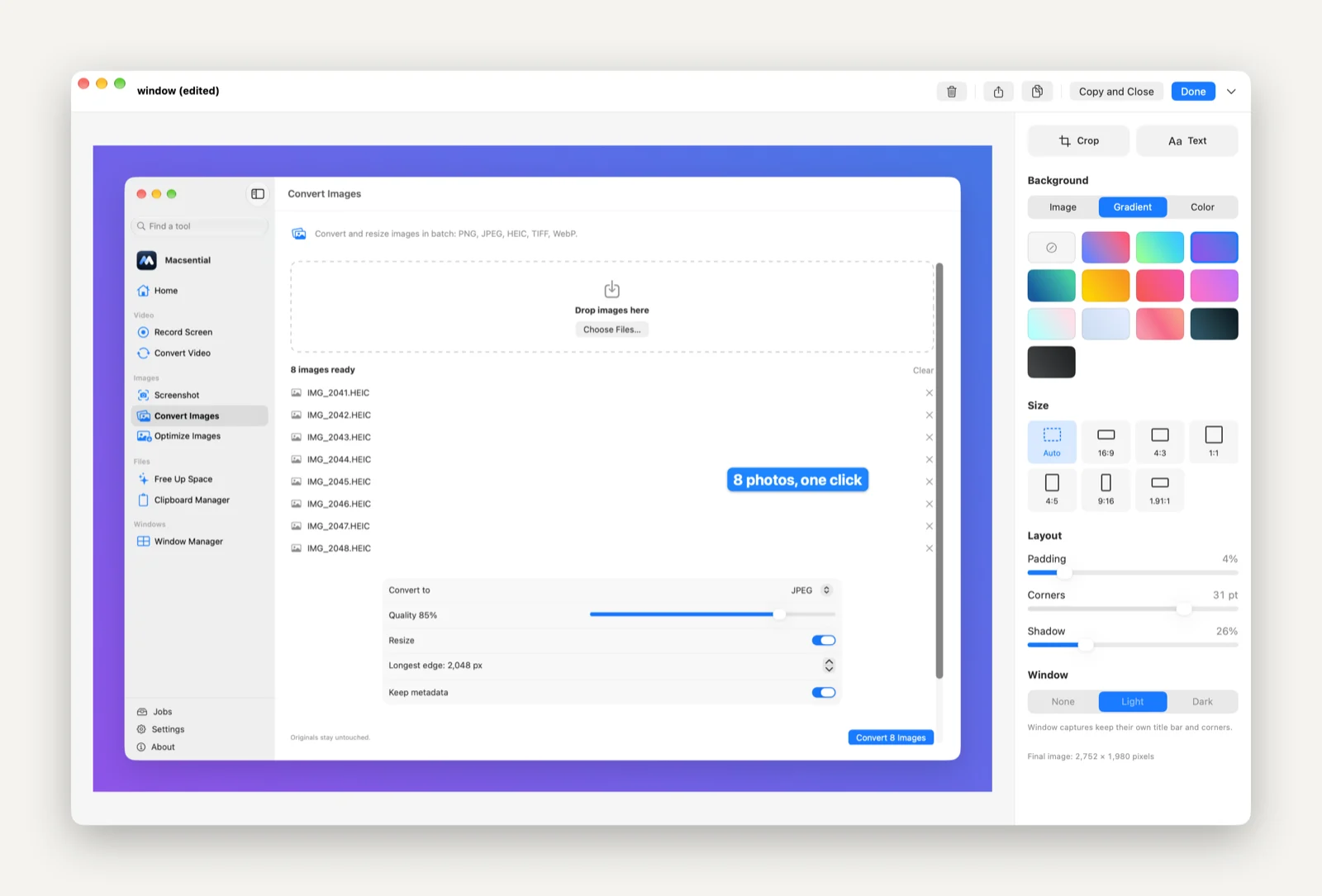
Macsential's Screenshot tool covers the "make this look good and send it" case.
- Capture. ⇧⌘1 shows an overlay: drag for an area, click a window, or press Return for the whole screen. ⇧⌘0 captures the screen under the pointer right away. Both shortcuts can be changed in Settings ▸ Screenshots, and Macsential warns you if a shortcut is still used by macOS or another app, instead of taking over macOS's own screenshot keys. Window captures keep their transparent rounded corners.
- After the capture. Open the editor, copy to the clipboard, or save to a folder, as you choose in Settings. Copy and save use the style you last used in the editor, so a quick capture still comes out framed.
- Edit. Crop, add text (color, size and an optional background behind it), then set the background: none, a solid color, a gradient, your own image, or a blurred copy of the screenshot itself so the colors match. Add padding, rounded corners and a shadow, a light or dark macOS title bar for area captures, and an aspect ratio for where it's going: 16:9 for slides and YouTube, 1:1 for Instagram and LinkedIn, 9:16 for stories, 1.91:1 for link previews.
- Export. Copy, share, or export PNG or JPEG.
Every change in the editor is undoable, and the preview is drawn by the same renderer as the exported file, so what you see is what you get.
Screen recording: closer than you'd think
CleanShot X 5.0, released in September 2026, added Studio Mode: a video editor with smart zooms that follow your cursor, trimming, cursor smoothing, motion blur and backgrounds. With that, both apps record and then let you polish the video afterwards.
CleanShot X still has some recording features Macsential doesn't: on-screen keystrokes, automatic Do Not Disturb and hiding desktop clutter while recording, motion blur, and share links from its Cloud with transcripts.
Here is how Macsential's Record Screen works and where it's different:
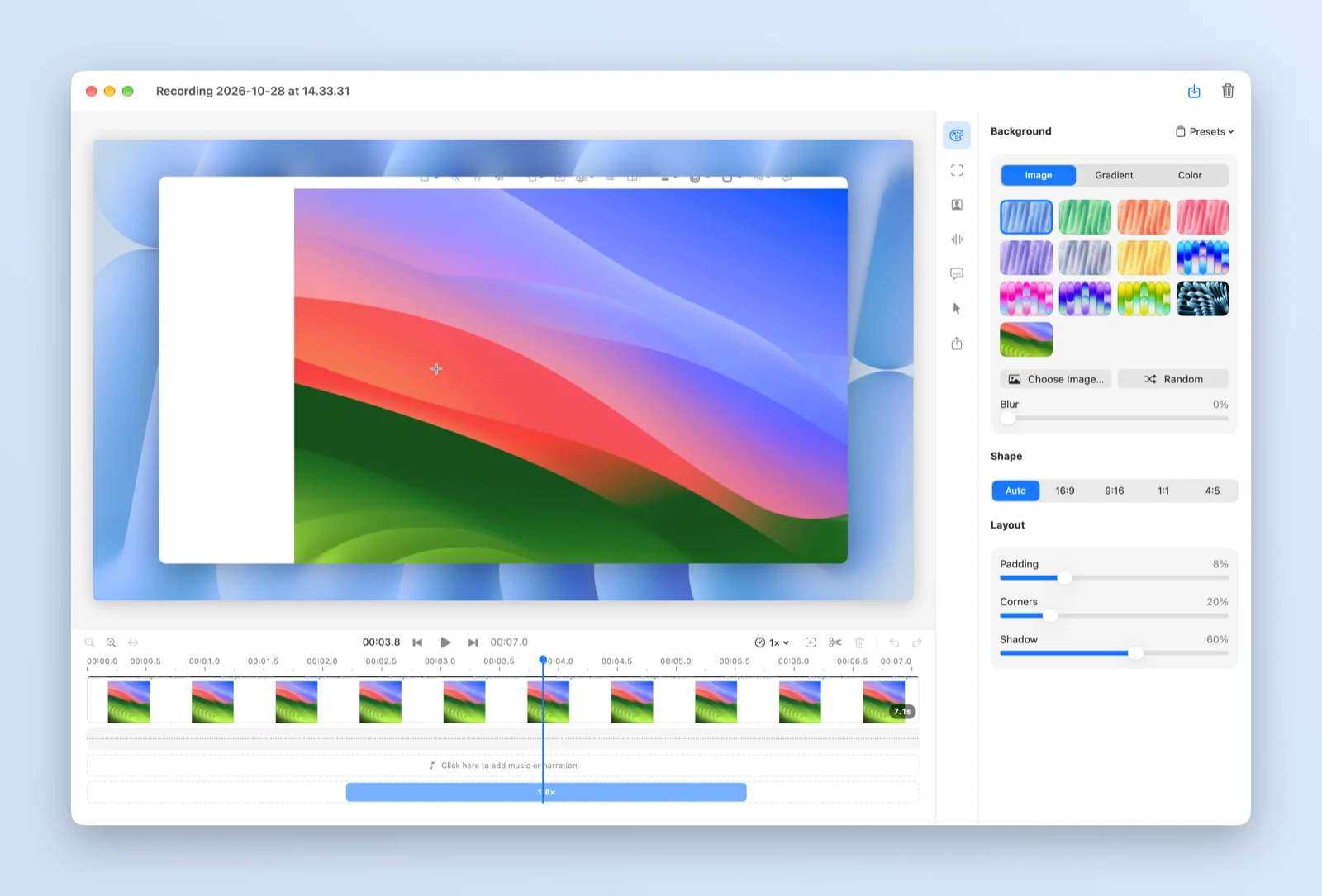
- Nothing is baked in. The screen, camera, microphone and Mac sound are recorded as separate tracks, and the pointer is recorded as movement data instead of being drawn into the video. Zoom, background, camera layout, speed, captions and audio are applied in the editor. You can come back to a recording weeks later, change the zooms or hide the camera, and export again from the original footage.
- Editing. Split, cut and trim; change the speed of a part; add zooms that hold a fixed point or follow the pointer, with a smooth ease in and out; make the pointer bigger, smooth its movement, add a ripple or highlight on clicks, or hide it when idle. The camera can sit in a corner or at a custom position, anywhere from square to circle, and fade out while you're zoomed in.
- Captions on the Mac. Captions come from Apple's on-device speech recognition, so your voice isn't sent anywhere. You can burn them into the video or export them as SRT or WebVTT files.
- Audio. Set the volume, mute parts (with short fades), and add other sound clips.
- Export. MP4 (H.264), MOV (HEVC) or GIF.
If you want to know how the recorder keeps the camera, sound and screen in sync, I wrote about it in building a screen recorder in Swift.
Cloud vs local
CleanShot Cloud is a real feature, not an add-on: one click gives you a link, Basic includes 1 GB, and Pro adds unlimited storage, team management and custom domains. For anyone who sends screenshots and clips to colleagues or customers all day, it saves steps.
Macsential has no cloud. All processing happens on your Mac and files are never uploaded. You share through the macOS share menu, Messages, Mail or whatever service you already use. Some people want that, for privacy or company rules; others will find it one more step.
What else you get with Macsential
The reason Macsential exists is that most Macs end up with a handful of small single-purpose apps. Besides Screenshot and Record Screen, the same license includes:
- Convert, resize and optimize images, and remove metadata, in batches (PNG, JPEG, HEIC, TIFF, WebP). See converting HEIC to JPG on a Mac and removing location data from photos.
- Convert video to MP4 or MOV, H.264 or HEVC.
- Window Manager: snap windows to halves, quarters and thirds with your own keyboard shortcuts.
- Free Up Space: finds caches, logs, build data and large files, and only touches what you select.
- Finder Quick Actions to optimize or convert images and convert video from a right-click.
If you'd otherwise buy a screenshot app, a window manager and an image converter separately, that matters. If you only want the best screenshot tool, it doesn't, and you should judge the two on the screenshot features above.
Requirements
This is a plain limit on Macsential's side: it runs only on Apple Silicon Macs with macOS 15 Sequoia or later. CleanShot X needs macOS 13 or later. If you're on an Intel Mac, Macsential won't run; if you're on macOS 13 or 14, CleanShot X is your option of the two.
Who should buy which
Buy CleanShot X if:
- You annotate screenshots with arrows, shapes or numbered steps.
- You need to blur or pixelate private information.
- You capture long pages with scrolling capture, or need to read QR codes from the screen.
- You share through links and want Cloud, or your team needs SSO and central management (Pro).
- You already pay for Setapp.
- Your Mac runs macOS 13 or 14.
Buy Macsential if:
- Your screenshots need a clean frame (crop, text, background, corners, shadow, aspect ratio) rather than markup.
- You record tutorials or demos and want to re-edit them later: zooms, camera layout, speed, on-device captions, MOV (HEVC) export.
- You want files to stay on your Mac.
- You'd use the other tools too: image and video conversion, window snapping, disk cleanup.
Both are paid once and include a year of updates, and both offer a refund (30 days for CleanShot X, 14 days for Macsential), so you can try either with little risk. Macsential is at /download, with pricing at /#pricing.
FAQ
Is CleanShot X a one-time purchase?
Yes. CleanShot X Basic is $35 once, with a year of updates and optional renewal at $19 a year. The Pro plan is a subscription that adds unlimited Cloud storage and team features, and the app is also part of Setapp's subscription.
Does Macsential have arrows, shapes or blur for screenshots?
No. Text is the only mark you can add to a screenshot in Macsential, by design. You can crop out a private part, but you can't blur it in place. If you need annotations, CleanShot X is the better choice.
Can Macsential do scrolling screenshots?
No. Macsential captures an area, a window or a whole screen. CleanShot X has scrolling capture.
Does either app upload my recordings?
Macsential never uploads files; everything is processed on your Mac, including captions. CleanShot X saves locally too, and uploads to CleanShot Cloud only when you choose to share that way.